Problem
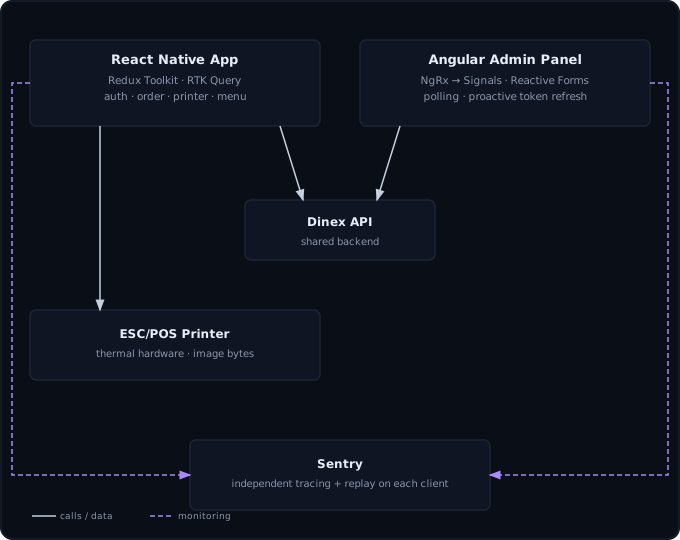
Restaurant staff need a floor app that takes orders, routes them to the kitchen,
and prints receipts and tickets without getting in the way during a full
service. The business side needs a separate admin surface for menu, staff,
branches, and reporting. Both have to work against the same backend without
drifting into inconsistent behavior, duplicated logic, or two different
definitions of what an order is.
System
Options weighed
For the floor app, native performance and direct access to the Epson ESC/POS
SDK mattered more than sharing code with the admin side, so it’s React Native
and Expo rather than one framework stretched across a POS terminal and a
back-office panel. For state, ad hoc Context/hooks stopped scaling once auth,
the active order, printer status, and menu data were all interacting; Redux
Toolkit plus roughly a dozen RTK Query endpoints replaced that with one
predictable state shape.
The admin panel predates current Angular best practice. Rather than a
big-bang rewrite, it’s migrating incrementally: some slices are still classic
NgRx (reducers, effects, entity adapters), most forms are still
ReactiveFormsModule, and newer state — like the menu-items store — is built
with @ngrx/signals and computed() selectors. Each generation gets touched
and modernized as its screens get real work, not on a schedule.
Tradeoff
Two frameworks means two dependency trees and two release pipelines with
nothing shared out of the box — error reporting, environment config, and
printing conventions have to be deliberately kept consistent rather than
inherited from a shared package. The incremental Angular migration has its
own cost: onboarding means reading both the NgRx-and-reactive-forms era and
the Signals era in the same codebase. The payoff on both counts is that
neither app was ever blocked waiting on a rewrite to ship features.
Outcome
Both apps are independently instrumented with Sentry rather than sharing one
monitoring setup — environment-gated tracing and session replay on the mobile
side (full sampling only in production, to keep noise and cost down in dev),
and tracing, replay, and a custom error handler on the Angular side that
recovers from stale-deployment chunk-load errors before reporting anything.
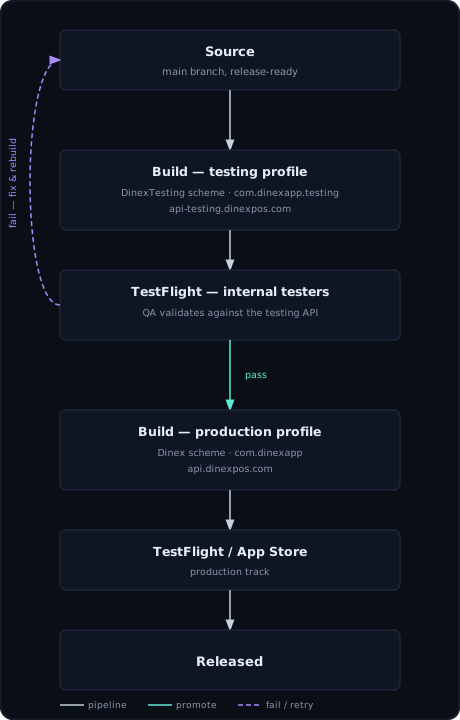
Releases go through a dual-environment pipeline — a testing build with its
own bundle identifier and its own API host, validated by internal testers
before a separately configured production build ever gets promoted:
Two production bugs are representative of the hardware-adjacent work on the
floor app. A hung native print call had no timeout, so a stuck job could
freeze the print screen indefinitely. The native bridge call to the printer
SDK doesn’t reliably reject on its own, so the fix is a bounded timeout per
batch and per invoice, plus a generation guard so a late callback from an
already-timed-out batch can’t corrupt the next one (representative shape,
not the literal source):
// InvoicePrinter.tsx — simplified
let batchGeneration = 0;

async function printBatch(invoices: Invoice[]) {
  const generation = ++batchGeneration;
  const timeoutMs = Math.max(
    MIN_PRINT_BATCH_TIMEOUT_MS,
    invoices.length * PRINT_TIMEOUT_MS_PER_INVOICE,
  );

  return Promise.race([
    printAllInvoices(invoices),
    new Promise((_, reject) =>
      setTimeout(() => reject(new PrintTimeoutError()), timeoutMs),
    ),
  ]).finally(() => {
    // A callback from a superseded batch must not touch current state.
    if (generation !== batchGeneration) return;
  });
}
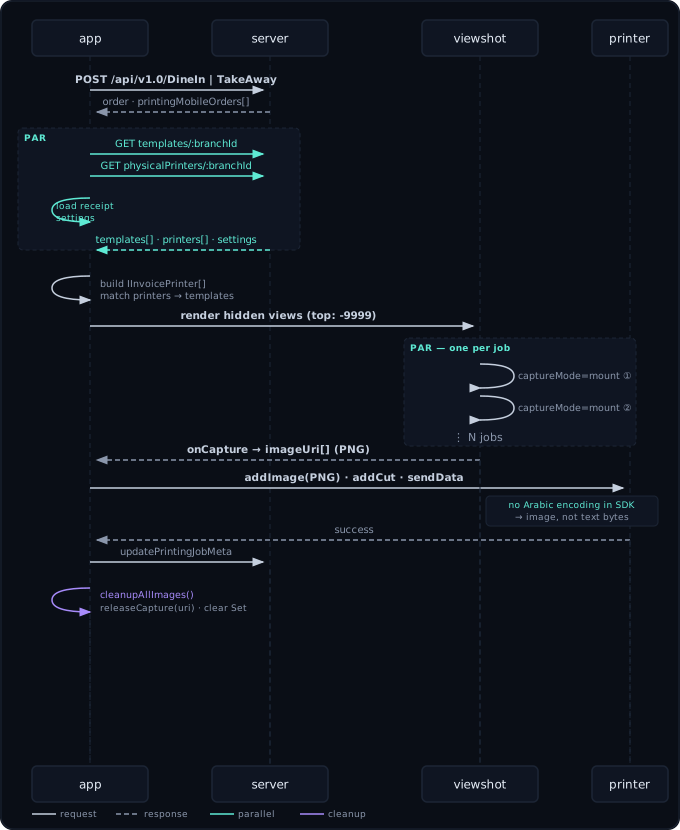
Separately, receipts printed at the wrong size on printer models that didn’t
match the original hardware, because the image width handed to the printer’s
addImage() call was hardcoded — fixed by making paper width a configurable
setting instead of a constant.